Invest from your
iPhone Home Screen
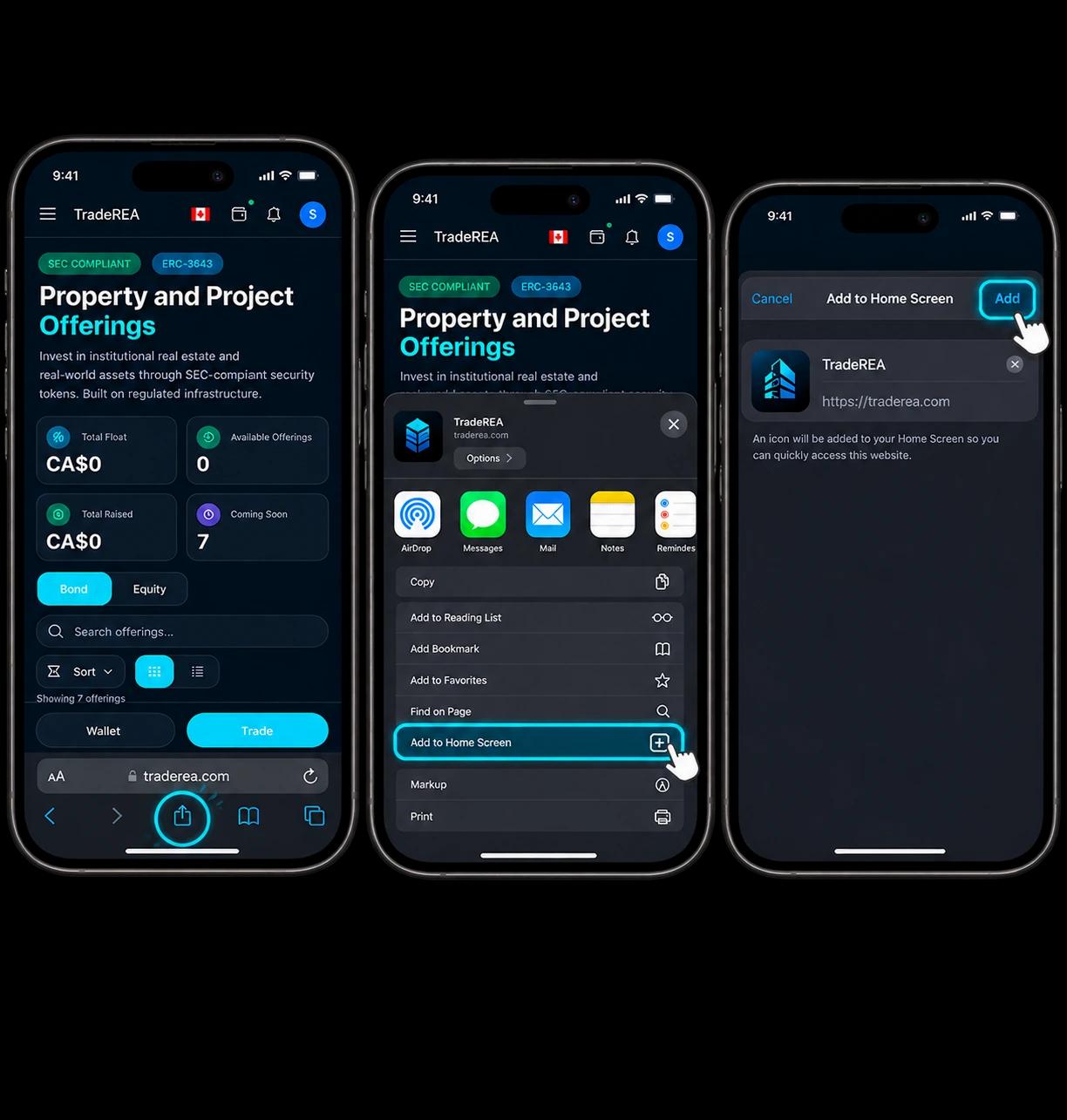
Add TradeREA to your iPhone in three taps and start investing in tokenized real estate instantly. It feels just like a native app.
Tap the Share button
Open traderea.com in Safari, then tap the Share icon at the bottom of your screen.
Add to Home Screen
Scroll down in the share sheet and tap "Add to Home Screen".
Tap Add to confirm
Hit "Add" in the top-right corner — TradeREA appears on your home screen instantly.
You must use Safari — Chrome on iOS does not support home screen installation.
Get the app on
Android in seconds
Install TradeREA straight from Chrome with three taps. Zero storage, zero waiting, full app experience directly from your home screen.
Open the browser menu
Open traderea.com in Chrome, then tap the three-dot menu (⋮) in the top-right corner.
Add to Home Screen
Tap "Add to Home Screen" from the dropdown — takes less than a second.
Confirm and done
Tap "Add" to confirm. TradeREA is now on your Android home screen, ready to launch.
Compatible with Chrome, Samsung Internet, Firefox and most Android browsers.
Get the TradeREA App
Open on your phone to install
Visit this page on your iPhone or Android device to install TradeREA.